



A website can look finished while important problems are still hidden underneath the interface. Broken links, incomplete forms, missing metadata, inaccessible controls, poor mobile behavior, tracking problems, and deployment mistakes can all affect a website after it goes live.
A pre-launch website audit is a structured review of the website before release. The purpose is not simply to find visual bugs. It is to verify that the site works, can be discovered by search engines, can be used across different devices, and is ready for real visitors.
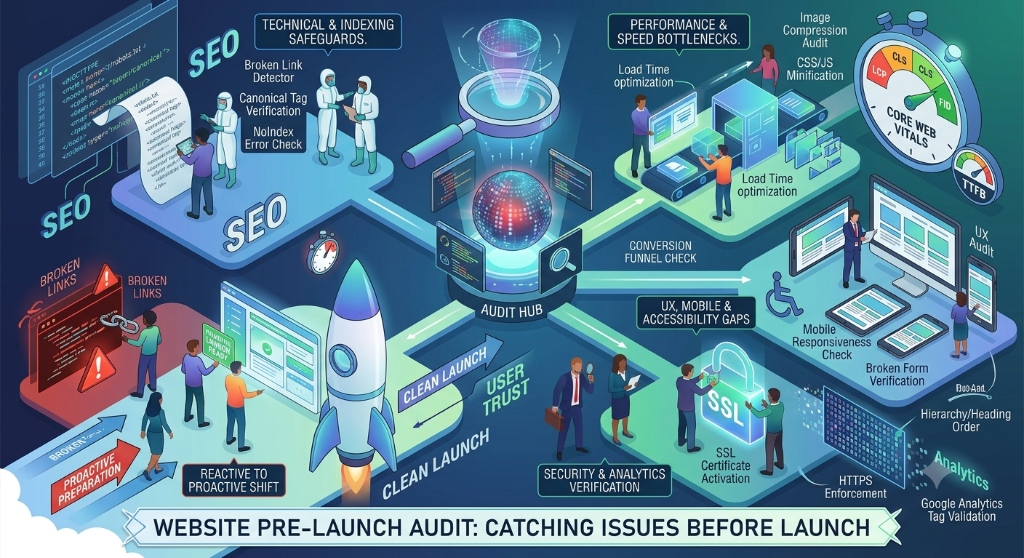
What a Pre-Launch Website Audit Should Cover
A useful audit should examine the website from several perspectives rather than checking only the homepage.
- Content and page completeness
- Navigation and internal links
- Forms and important user interactions
- Technical SEO
- Mobile and responsive behavior
- Accessibility
- Performance
- Analytics and conversion tracking
- Security and configuration
- Production deployment
The exact checks depend on the type of website, but these areas provide a practical starting point for most projects.
1. Check Every Important Page
Start by creating a list of the pages that are expected to exist on the production website.
Do not check only the homepage. Review important service pages, product pages, blog posts, contact pages, landing pages, legal pages, and any other pages that are part of the intended user journey.
For each page, verify that:
- The page loads successfully.
- The intended content is present.
- The title and heading are appropriate.
- Images load correctly.
- Links point to the correct destinations.
- There are no unfinished sections or placeholder elements.
This simple inventory can catch problems that are easy to miss when reviewing a website page by page without a defined scope.
2. Test Navigation and Internal Links
Navigation should help visitors move through the website without encountering dead ends.
Test the main navigation, dropdown menus, footer links, breadcrumbs where applicable, buttons, related-content links, and links inside important page content.
Pay particular attention to links that were changed during development. A page can appear complete while one old URL still points to a development route, an outdated page, or a missing resource.
For larger websites, a crawl can help identify broken internal links and pages that are difficult to reach through normal navigation.
3. Test Forms and User Interactions
Forms deserve direct testing because a form that looks correct is not necessarily functioning correctly.
Test each important form from the perspective of an actual visitor.
- Submit valid information.
- Leave required fields empty.
- Enter invalid information.
- Check validation messages.
- Confirm successful submission behavior.
- Verify that the expected recipient or system receives the submission.
- Check what happens after submission.
Also test interactive elements such as menus, accordions, modals, search interfaces, filters, sliders, login flows, and other controls that affect the user's ability to complete a task.
4. Review Technical SEO
Technical SEO checks whether search engines can correctly access, understand, and index the pages that are intended to appear in search results.
Google's SEO Starter Guide provides general guidance on making websites easier for search engines to understand.
Before launch, review:
- Page titles.
- Meta descriptions where appropriate.
- Heading structure.
- Canonical URLs where needed.
- Robots directives.
- XML sitemap.
- Internal linking.
- Important image alt text.
- Redirects for changed URLs.
Also verify that pages that should be public are not accidentally blocked from crawling or indexing by development settings.
5. Check Robots.txt and Sitemap Configuration
A production website should have deliberate crawling and indexing configuration.
Review the site's robots.txt file and confirm that it does not accidentally block important production content.
Then review the XML sitemap. URLs included in the sitemap should represent pages that the site actually intends search engines to discover and index.
Remove development URLs, duplicate URLs, or irrelevant paths from the sitemap if they were accidentally included.
6. Review Mobile and Responsive Behavior
Do not treat responsive testing as a final visual check of the homepage.
Review important pages at different viewport sizes and test the interactions that mobile visitors actually use.
- Navigation opens and closes correctly.
- Text remains readable.
- Buttons are usable.
- Forms fit the available width.
- Images do not overflow their containers.
- Tables have an appropriate mobile behavior.
- Horizontal scrolling does not appear unexpectedly.
- Important content is not hidden or clipped.
Responsive problems often occur on secondary pages even when the homepage appears correct.
7. Check Accessibility
Accessibility should be reviewed before launch rather than treated as a later enhancement.
The W3C Web Content Accessibility Guidelines provide a widely used framework for evaluating web accessibility.
Check whether important functionality can be used with a keyboard, whether focus is visible, whether headings are meaningful, whether form controls have appropriate labels, and whether images that convey information have useful alternative text.
Automated accessibility tools can identify some issues, but manual testing is also important because not every usability or accessibility problem can be detected automatically.
8. Check Page Performance
A website audit should also consider how efficiently pages load and respond.
Look for unnecessarily large images, unused resources, excessive third-party scripts, inefficient loading behavior, and other assets that can increase page weight.
Google's Lighthouse documentation describes how Lighthouse can be used to audit web pages for areas including performance, accessibility, SEO, and other quality characteristics.
Performance testing should focus on important user journeys rather than treating one homepage score as the complete performance assessment.
9. Review Images and Media
Every important image should be checked for both presentation and technical behavior.
- Does the image load correctly?
- Is the resolution appropriate for its displayed size?
- Is the file unnecessarily large?
- Does the image maintain the intended aspect ratio?
- Does meaningful image content have appropriate alternative text?
- Do images behave correctly on mobile?
Also check video, audio, embedded content, and other media if they are part of the website.
10. Verify Analytics and Conversion Tracking
A website can launch successfully while its measurement setup is incomplete.
Verify that the analytics system is installed in the intended production environment and that important conversion events are being recorded correctly.
Depending on the website, these events might include contact-form submissions, purchases, registrations, downloads, or other meaningful actions.
Test tracking rather than assuming that adding a tracking script automatically means every important event is being measured correctly.
11. Check Security and Production Configuration
Before launch, review configuration that may have been acceptable during development but should not remain exposed in production.
- Production credentials are stored securely.
- Development credentials are not exposed in the frontend.
- Debug settings are disabled where appropriate.
- Environment variables contain the intended production values.
- HTTPS is correctly configured.
- Authentication and authorization rules work as expected.
- Unnecessary development endpoints are not publicly exposed.
Security requirements vary by application, so the audit should be adapted to the technologies and data handled by the project.
12. Check Error Pages and Failure States
Visitors will eventually encounter an invalid URL, failed request, missing resource, or temporary service problem. A pre-launch audit should test these situations too.
Check the site's 404 page and other relevant error states. Confirm that users can understand what happened and can continue navigating instead of reaching a dead end.
For applications with server-side operations, also test expected failure states such as failed submissions, unavailable data, expired sessions, and validation errors.
13. Review Content Quality
Technical checks cannot replace a content review.
Read the important pages as a visitor would. Look for incomplete sentences, placeholder copy, outdated information, duplicated sections, incorrect contact details, unnecessary claims, inconsistent terminology, and calls to action that do not match the page purpose.
Every important page should answer a clear user question or support a clear user task.
14. Check Legal and Trust Information
Depending on the website and its business model, verify that required or expected trust information is available and accurate.
This can include contact information, privacy information, terms, cookie notices, business details, refund information, or other policies relevant to the service.
Legal requirements differ by jurisdiction and business activity, so these checks should be reviewed against the site's actual requirements rather than copied from another website.
15. Compare Development and Production
A website that works correctly in development can still behave differently after deployment.
After deploying to a staging or production-like environment, repeat the most important checks against the actual deployed version.
Verify:
- Production URLs.
- Assets and images.
- API connections.
- Forms.
- Authentication.
- Analytics.
- Redirects.
- Robots.txt.
- Sitemap.
- Environment-specific configuration.
This is especially important when the production environment uses different domains, APIs, credentials, hosting configuration, or build settings.
16. Create a Pre-Launch Issue List
Finding problems is only useful if the team can track and resolve them.
Create a simple issue list containing the page or feature, the problem, its severity, the person responsible, and the current status.
| Field | Purpose |
|---|---|
| Page or feature | Identifies where the problem occurs |
| Issue | Describes the problem clearly |
| Severity | Shows how important the issue is before launch |
| Owner | Identifies who is responsible for resolving it |
| Status | Tracks whether the issue is open, fixed, or verified |
After an issue is marked as fixed, test it again rather than assuming the change solved the original problem.
A Practical Website Pre-Launch Checklist
- Confirm that every important page exists and loads correctly.
- Test main navigation, footer links, buttons, and important internal links.
- Submit every important form using both valid and invalid inputs.
- Review page titles, headings, metadata, and canonical configuration.
- Check robots.txt and XML sitemap configuration.
- Test important pages at mobile and desktop viewport sizes.
- Check keyboard navigation, focus states, labels, and alternative text.
- Review page performance and large or unnecessary resources.
- Verify images, videos, and embedded media.
- Confirm analytics and important conversion events.
- Review production credentials, environment variables, HTTPS, and security configuration.
- Test 404 pages and important application failure states.
- Proofread important content and remove placeholder or outdated information.
- Verify relevant trust, privacy, terms, and business information.
- Repeat critical checks on the deployed environment.
- Track discovered issues and verify every important fix before launch.
How to Run the Audit Efficiently
A large website does not need to be reviewed randomly. Divide the audit into passes so that each pass has a specific purpose.
Pass 1: Crawl and Inventory
Identify the pages, URLs, assets, redirects, and important user journeys that need to be reviewed.
Pass 2: Functional Testing
Test navigation, forms, authentication, search, filters, buttons, and other important interactions.
Pass 3: SEO and Accessibility
Review crawlability, metadata, internal links, sitemap configuration, headings, keyboard access, labels, and other accessibility considerations.
Pass 4: Performance and Mobile
Review important pages across viewport sizes and investigate unnecessary resources or performance bottlenecks.
Pass 5: Production Verification
Repeat critical checks against the actual deployed website and confirm that production configuration behaves as expected.
What a Website Audit Does Not Guarantee
A completed audit does not mean that a website can never have a problem after launch. Websites depend on browsers, third-party services, hosting infrastructure, APIs, content updates, and future code changes.
The purpose of a pre-launch audit is to reduce avoidable problems and provide evidence that the important parts of the website were reviewed before release.