



WordPress became one of the most widely used platforms on the web for a simple reason: it makes publishing and managing a website accessible to people who are not developers. A marketing team can update a page, an editor can publish a post, and a business owner can launch a site without waiting on engineering resources for every change. Combined with a large ecosystem of themes, plugins, and hosting options, WordPress is a practical choice for a large share of the websites built today.
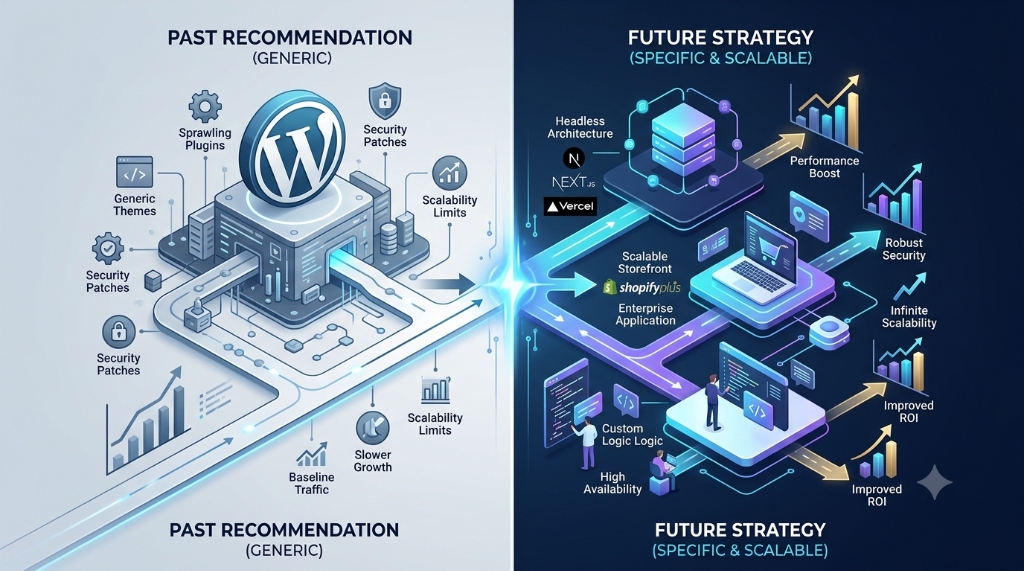
The issue we ran into was never WordPress itself. It was the habit of reaching for it as the automatic answer before understanding what a project needed. Two projects that both start with "we need a website" can have very different requirements—one might be a content-driven marketing site, the other a workflow-heavy internal tool that only resembles a website on the surface. Treating every request the same way, regardless of what it actually requires, is where the recommendation stopped making sense.
This article explains the reasoning we now use: start from the project's requirements and let those point to the right platform, rather than starting from a preferred platform and forcing the requirements to fit it.
WordPress Still Makes Sense for Many Projects
None of this is an argument against WordPress. For a large number of projects, it remains a sensible, low-friction choice.
- Content-driven websites where pages, posts, and media are the primary product.
- Blogs and publishing sites that benefit from a mature editorial workflow.
- Marketing websites updated frequently by non-technical staff.
- Company and brochure websites describing a business, its services, and its contact information.
- Projects where non-technical users need to manage content directly.
- Projects that benefit from an established CMS with a large plugin ecosystem and broad hosting support.
- Situations where existing themes or plugins already cover most of the required functionality.
- Businesses that want a familiar content-management workflow their team already knows.
When the core requirement is publishing and managing content, WordPress solves a real problem well. There is nothing wrong with choosing it when the requirements actually fit what it was built to do.
Where WordPress Can Become the Wrong Fit
The fit changes when a project is no longer primarily a content website. WordPress can be extended a long way beyond content management—but at some point the extension itself becomes the source of complexity.
- Highly custom business workflows that do not map cleanly to posts, pages, or custom fields.
- Complex application logic involving conditional steps, calculations, or state transitions.
- Large amounts of custom functionality beyond what the CMS and its plugins were designed to handle.
- Complex user roles and permissions needing fine-grained control.
- Multiple internal systems and integrations communicating in real time.
- Systems requiring a tightly controlled, predictable architecture rather than one shaped by plugin behavior.
- Applications that behave more like software products—with logic, state, and users performing tasks—than like a website presenting content.
- Cases where reaching the desired functionality means stacking many plugins and custom code together.
WordPress can technically do most of this through custom plugins, custom post types, and enough development effort. The question is whether that remains the most practical route, or whether the added layers of customization add more complexity than they remove.
The Problem With Choosing a Platform Too Early
Committing to a platform before the requirements are understood puts the decision in the wrong order. It tends to shape how requirements get interpreted later, forcing the project to bend around what the platform makes easy rather than what the business actually needs.
A more reliable sequence is to work out the requirements first, then evaluate which platform fits them, including:
- Business and functional requirements — what the project and system need to accomplish.
- User roles — who uses the system and what each is allowed to do.
- Integrations — which external systems must be connected.
- Expected traffic and security requirements.
- Data requirements — how information is structured and queried.
- Maintenance requirements and long-term ownership.
- Team capabilities — what the team can realistically build and support.
- Future changes — how the project is likely to evolve.
This is also why the same business can reasonably choose WordPress for one project and a custom application for another—a company might run its marketing site on WordPress while building a customer portal as a custom application, not as a contradiction, but because the two projects have different requirements.
WordPress vs. a Custom Application
Neither approach is universally better. Each comes with a different set of trade-offs, and the right choice depends on which trade-offs fit the project.
| Area | WordPress | Custom Application |
|---|---|---|
| Content management | Strong out of the box; a mature editorial interface. | Usually requires building or integrating a CMS layer. |
| Custom business logic | Possible via plugins and code, but not the platform's core strength. | Built to fit the exact logic the business needs. |
| Integrations | Common integrations available as plugins; uncommon ones need custom development. | Designed around the specific integrations required. |
| Development flexibility | Flexible within the CMS's conventions and plugin architecture. | Flexible by design, without another system's conventions. |
| Maintenance | Core, theme, and plugin updates need regular tracking. | The team owns all dependencies and patches directly. |
| Performance considerations | Depends on hosting, caching, and the quality of active plugins. | Depends on the application's own architecture and hosting. |
| Security responsibilities | Shared across core, themes, and plugins, which must stay current. | Falls entirely on the development team. |
| Scalability | Can scale with the right hosting and architecture, though heavy customization adds constraints. | Designed in from the start around actual requirements. |
| Development cost/complexity | Lower upfront cost for content-focused sites; rises with heavy customization. | Higher upfront cost, offset by a purpose-built architecture. |
The table does not point to one column as the correct answer. It shows where each approach's strengths fit certain kinds of projects, and where its trade-offs start to cost more than they save.
When a Custom Stack May Be More Appropriate
A custom stack becomes worth considering when the project's requirements pull away from what a CMS is designed to do.
- The product contains complex business rules that need to be implemented precisely, not approximated through plugin configuration.
- The application has highly customized workflows specific to how the business operates.
- The project requires specialized integrations needing close control over data flow and error handling.
- The system has complex data relationships beyond what a content-oriented data model supports comfortably.
- The needed functionality would require so much WordPress customization that the platform is no longer doing most of the work.
- The business needs greater control over how the application is structured, tested, and deployed.
- The product is fundamentally a software application—something users operate to perform tasks—rather than a website presenting content.
Choosing a custom stack is not a free upgrade. It shifts more responsibility onto the development team: every dependency, security patch, and infrastructure decision becomes something the team owns directly. That is a reasonable trade for the right project, and an unnecessary burden for the wrong one.
When We Would Still Choose WordPress
Stopping the habit of recommending WordPress for every client does not mean stepping away from WordPress. It is still a sensible recommendation in plenty of situations:
- Company websites that mainly need to present information about the business.
- Blogs and publishing platforms built around regularly published content.
- Marketing websites that need frequent updates from non-technical staff.
- Content-heavy websites where the main job of the system is organizing and presenting content.
- Projects where editors need an easy, familiar CMS without relying on developers for routine changes.
- Projects where existing WordPress functionality already satisfies the requirements without requiring excessive customization.
In these cases, WordPress does exactly what it was designed to do, and there is no reason to build something custom just to avoid using it.
A Practical Framework for Choosing the Right Approach
The following questions are the ones we now work through before recommending a platform:
- Is the project mainly content — pages, posts, and media — or mainly functionality?
- Who will manage the content, and how technical are they?
- Does the business require complex custom workflows beyond publishing content?
- Does the project need many third-party integrations, and how tightly must they be controlled?
- Is the project actually a web application with a website-like interface?
- How much customization would be required to reach the desired functionality?
- What are the security requirements, and who will maintain them?
- What level of ongoing maintenance will the team realistically handle?
- What technical skills are available, now and for future maintenance?
- How is the project expected to evolve over the next few years?
The answers point to which platform fits this particular project, not to a single "correct" platform in the abstract. A project that is mostly content, managed by non-technical editors, with light integrations and modest customization needs, usually points toward WordPress. A project with complex workflows, specialized integrations, and functionality that behaves like software rather than a webpage usually points toward a custom application.
Common Mistakes When Choosing WordPress
Choosing WordPress Only Because It Is Popular
Popularity reflects ecosystem size and community support, not whether a specific project's requirements fit the platform. A widely used tool can still be the wrong tool for a particular job.
Installing a Plugin for Every Requirement
Each plugin is another dependency to update, secure, and keep compatible. A site built from dozens of stacked plugins can end up harder to maintain than a smaller, purpose-built application.
Ignoring Long-Term Maintenance
A technology decision is also a maintenance commitment. It matters who will apply core, theme, and plugin updates after launch, and whether that work was accounted for, not treated as an afterthought.
Confusing a Website With a Web Application
A website presents content to visitors. A web application is a tool users operate to accomplish tasks, often with accounts, permissions, and stateful workflows. Assuming a content platform can absorb application-level complexity without cost is a common source of later frustration.
Choosing Technology Before Defining Requirements
When the platform is chosen first, requirements get shaped around what it makes convenient, rather than the platform being evaluated against what the requirements call for. Defining requirements first keeps the choice honest.
WordPress Is Not the Problem
WordPress remains a legitimate, capable technology choice, and it is still the right recommendation for a large share of the projects we see. The issue was never the platform—it was using one platform as the default answer for every type of project. A technology decision should be based on requirements, constraints, and a realistic maintenance plan; no single platform is universally correct for every project.
Final Takeaway
We stopped treating WordPress as the default recommendation—not because WordPress is bad, but because different projects require different solutions. It is still the right answer for content-driven sites, blogs, and marketing websites managed by non-technical editors, and a custom application is still the right answer when a project involves complex workflows, deep integrations, or functionality that behaves more like software than a webpage. The practical takeaway is to lead with the project's requirements, use the framework above to evaluate the fit, and choose the platform that matches what the project actually needs—rather than the platform that is easiest to default to.