


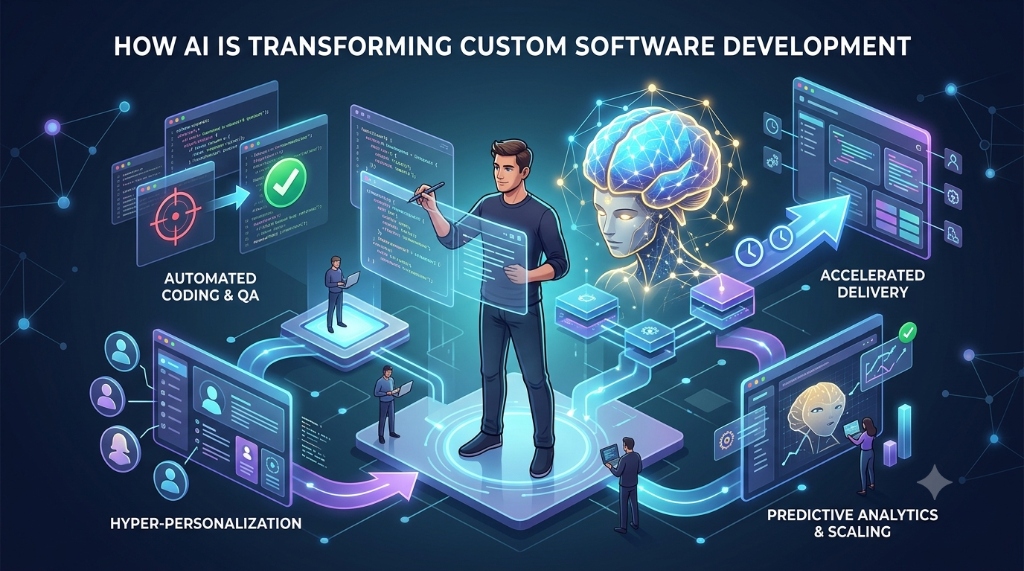

Custom software development still moves through the same basic stages it always has — understanding what to build, designing it, writing it, testing it, reviewing it, and maintaining it. What's changed is how much of the work inside each stage can now involve an AI tool, and how much still can't.
This article looks at that shift stage by stage: where AI coding tools genuinely change the day-to-day work of building custom software, and where the responsibility for correctness, architecture, security, and business judgment stays firmly with the engineering team.
What "AI-Assisted Software Development" Actually Means
AI-assisted development covers tools with different levels of involvement: inline code completion suggesting the next few lines as a developer types, chat-based assistants that answer questions or generate a function on request, and increasingly agentic tools that can read across a repository, change multiple files, run commands, and iterate toward a goal with less direct supervision.
These are meaningfully different levels of capability. A completion suggestion accepted or rejected line by line carries a different risk profile than an agent that independently modifies several files and runs tests before a human looks at any of it. Knowing which category a tool falls into matters for how much review its output needs.
AI Across the Software Development Lifecycle
A practical, non-ranked view of where AI assistance tends to help and what still needs human verification at each stage:
| Development stage | How AI can assist | What humans still need to verify |
|---|---|---|
| Requirements | Structuring rough notes into tasks, surfacing missing questions, proposing edge cases | Actual business rules, priorities, and acceptance criteria |
| Planning | Drafting implementation plans, identifying dependencies between changes | Whether the plan fits real constraints, timelines, and team capacity |
| Architecture | Comparing approaches, explaining trade-offs and patterns | Fit with scale, reliability, security, and existing infrastructure |
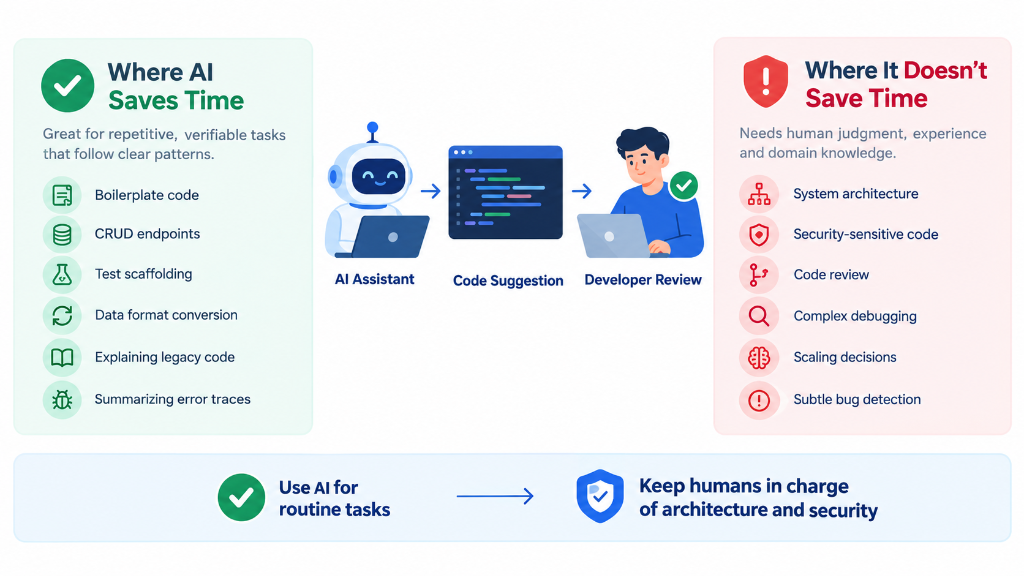
| Coding | Boilerplate, CRUD endpoints, data transformations, scaffolding | Correctness, conventions, and integration with the rest of the system |
| Refactoring | Mechanical transformations with a clear before/after state | That behavior is genuinely preserved, not just superficially similar |
| Testing | Test scaffolding, edge-case suggestions, test data generation | Whether tests verify intended behavior, not just the implementation as written |
| Debugging | Interpreting errors, proposing hypotheses, explaining unfamiliar code paths | The actual root cause, confirmed by reproducing and fixing the issue |
| Code review | Flagging obvious issues, summarizing a diff, suggesting checks | Functional correctness, security, and architectural fit |
| Documentation | Drafting docstrings, summarizing files, explaining code to new contributors | Accuracy against the actual current behavior of the code |
| Deployment preparation | Checklists, configuration summaries, changelog drafting | That the release is actually safe to ship, and rollback plans are sound |
| Maintenance | Explaining legacy code, drafting migration plans, surfacing dead code | Whether a proposed change is safe given real-world usage and history |
Requirements and Discovery
AI tools can help turn a rough, informal requirement into a more structured task list, surface questions the original request left unanswered, and propose edge cases a written spec might have missed. They can also summarize existing documentation or an existing codebase to help a developer get oriented faster.
What they should not do is invent business requirements. A generated list of "likely" acceptance criteria is a useful starting draft, not a substitute for confirming the real ones — business rules, priorities, acceptance criteria, constraints, compliance requirements, and expected user behavior still need confirmation from the actual stakeholders.
Architecture and Technical Planning
AI assistance can be genuinely useful for comparing implementation approaches, explaining the trade-offs of an architectural pattern, drafting a diagram or written description of a proposed structure, and reviewing a proposed design for obvious gaps.
What it can't reliably do is design the correct architecture for a specific system on its own. Architecture decisions depend on knowledge an assistant doesn't have unless it's told — system constraints, expected scale, reliability requirements, security posture, existing infrastructure, team capabilities, operational requirements, and long-term maintenance burden. An AI-generated architecture proposal is a starting point for discussion, not a decision.
Coding
Example (hypothetical): a developer gets a well-defined request to add a new CRUD endpoint that follows the same shape as several existing ones in the codebase — same validation pattern, same response format, same error handling convention. This is close to the ideal case for AI-assisted coding: the pattern already exists, the correct behavior is easy to check against, and the assistant is mostly reproducing a known shape rather than inventing new logic. Boilerplate, repetitive CRUD code, data transformations, API scaffolding, test scaffolding, documentation comments, and converting code between similar patterns or languages fall into this same category of task.
Generated code in any of these cases should still be treated as proposed implementation, not automatically trusted production code. It needs to be read, understood, and checked against the actual requirement before it's merged — being a good fit for AI assistance reduces typing, not review.
Testing
AI tools can help with unit-test scaffolding, integration-test scenarios, edge cases a developer might not have thought of, sample test data, explaining why an existing test is failing, and surfacing scenarios that currently have no test coverage.
Generated tests do not automatically prove correctness. A common failure mode is a test written to match whatever the implementation currently does, rather than what it's supposed to do — such a test would pass even if the underlying logic is wrong. Developers need to verify that generated tests check intended behavior, not simply mirror the code they're testing.
Debugging
AI assistance can help interpret an error message, identify likely causes, suggest debugging steps, walk through a stack trace, propose hypotheses to test, and explain an unfamiliar code path involved in the failure — meaningfully speeding up the early, exploratory part of debugging, especially for common failure patterns.
The risk is accepting the first plausible-sounding explanation. A confident, well-written explanation of a bug's cause can still be wrong — models are good at producing fluent, reasonable text regardless of whether it's correct. The fix isn't distrusting every suggestion, but reproducing the issue and verifying the proposed fix actually resolves it.
Code Review
Example (hypothetical): a developer needs to modify a discount-calculation function that has several interacting business rules — tiered pricing, a promotional override, and a rounding rule that only applies to certain product categories. An AI assistant produces a change that looks complete and passes a quick read-through. Because the rules interact in ways the assistant wasn't necessarily told about explicitly, this is exactly the kind of change that needs a reviewer to check the logic against the actual business rule, not just confirm the code runs.
Reviewing AI-generated code should cover the same ground as reviewing any other change: functional correctness, architecture alignment, readability, maintainability, edge cases, security, dependency choices, error handling, test quality, and performance where relevant. GitHub's own guidance on reviewing AI-generated code frames this as automated checks plus human review, not either one alone.
It's more accurate to say AI-generated code can contain incorrect logic, security issues, dependency problems, or misunderstood requirements — not that it's inherently insecure. The right response is the same review discipline applied to any proposed change, calibrated to what's at stake.
Developer Onboarding and Codebase Exploration
For a new team member, or a developer working in an unfamiliar part of a large codebase, asking an assistant to explain what a file does, trace what calls a function, or summarize how a module fits into the system can shorten orientation considerably. This works best as a starting point — the developer still needs to confirm the explanation against the actual code, since an assistant can miss related code it didn't search for.
Agentic Development Workflows
There's a real difference between AI code completion or chat — where a developer requests a suggestion and decides whether to use it — and AI agents performing multi-step development tasks with less direct supervision. Per GitHub's documentation on Copilot agents and on integrating agentic AI into the development lifecycle, modern coding agents can potentially inspect a repository, modify multiple files, run tests, execute commands, do research, and assist with a pull request.
Greater capability needs greater control: what the agent can access, what commands it can run, how thoroughly its output gets reviewed, whether tests are actually run rather than assumed to pass, and how sensitive information is handled. Not every AI coding tool has the same capabilities — a simple autocomplete tool and a repository-modifying agent carry very different risk profiles, worth being specific about before deciding how much oversight a workflow needs.
Where AI Still Needs Strong Human Oversight
Some responsibilities stay with the engineering team and the business, regardless of how capable the tooling becomes:
- Understanding business goals and translating them into technical priorities.
- Deciding what the actual requirements are.
- Approving architectural decisions.
- Understanding organizational and regulatory risk.
- Validating critical business logic against real-world rules.
- Making security decisions.
- Making compliance decisions.
- Reviewing changes that affect production systems.
- Accepting or rejecting a proposed change.
- Deciding when a solution is good enough to ship.
None of this is about AI being unreliable in general — it's that these decisions require context, accountability, and judgment that belong to the people responsible for the software and the business it supports.
Security and Dependency Risks
Example (hypothetical): an AI coding agent, working on a task, proposes installing a package to handle a piece of functionality. Before accepting that suggestion, a developer should confirm the package actually exists under that name, is the appropriate choice for the task, is actively maintained, and doesn't introduce a dependency the team wouldn't otherwise choose to take on. Generated code has been known to reference packages that don't exist or aren't the ones a developer would expect — sometimes referred to as "hallucinated" dependencies — which is exactly the kind of thing that should be caught in review rather than installed on trust.
Beyond dependency choices, practical security considerations include: generated code containing an insecure pattern (missing input validation, weak error handling, an incomplete access check); the risk of exposing secrets or credentials if sensitive configuration is shared as context; how much source code or repository context a tool has access to and where that context is processed; the scope of permissions granted to an agent, including its ability to run destructive commands; and running dependency and security scanning on generated code the same way as any other change.
OWASP's Secure Coding with AI Cheat Sheet covers this in more depth. Not every AI tool exposes source code or handles secrets the same way — behavior depends on the specific tool, its configuration, environment, and permissions, which is a reason for deliberate configuration and human approval before consequential changes, not for treating every tool as equally risky.
The Hidden Cost of Reviewing AI-Generated Code
Generation is one step in a longer sequence: prompting, gathering context, generation, inspection, testing, debugging, security review, integration, and final approval. Reducing time spent generating doesn't reduce the judgment required at the other steps — a function generated in seconds can still take real time to properly review if it touches logic needing independent verification. That review time is necessary regardless of who or what produced the code.
A Practical AI-Assisted Development Workflow
- Define the requirement as precisely as it can be defined before involving an AI tool.
- Give the AI relevant context — related files, existing conventions, and any constraints it wouldn't otherwise know.
- Ask for a plan before asking for the full implementation, for anything beyond a small, well-understood change.
- Review the plan and confirm it reflects the actual requirement.
- Implement a small scope rather than a large one where practical.
- Inspect the diff in full before running anything.
- Run tests — existing ones and any new ones the change needs.
- Review security and dependencies introduced by the change.
- Run static analysis or linting where the project already uses it.
- Complete human review the same as any other proposed change.
- Merge only after validation, not once the code simply runs.
- Document important decisions, especially anything non-obvious the AI tool introduced.
The exact workflow varies by project, team, and how much is at stake in a given change — a small internal script doesn't need the same rigor as a change touching authentication or billing logic.
What Engineering Teams Should Standardize
Teams get more consistent, safer results when they standardize a few things rather than leaving usage ad hoc: which tools are approved and under what configuration, what project context developers should provide, what review process AI-assisted changes go through before merging, what permissions agentic tools get (and in what environments), how security scanning applies to AI-generated code, and what should never be shared as context — credentials, customer data, or anything covered by a compliance requirement.
Common Mistakes When Adopting AI Coding Tools
- Giving AI too little context, then treating a generic result as if it should have matched the project's specifics.
- Accepting the first generated solution without comparing it against what was actually asked for.
- Asking for huge changes in one prompt instead of breaking work into reviewable steps.
- Skipping tests because the code looks correct.
- Trusting generated tests without checking that they test the right behavior.
- Installing unverified dependencies an assistant suggested without confirming they're real and appropriate.
- Allowing unnecessary permissions for agentic tools beyond what a task actually requires.
- Ignoring project conventions that the AI tool wasn't given context about.
- Reviewing only whether the code compiles, rather than whether it's correct, secure, and maintainable.
- Treating AI output as a substitute for requirements analysis instead of a starting point that still needs confirming.
Practical Checklist for AI-Assisted Development
- Are the requirements clear enough to hand off, to a person or an AI tool?
- Was enough project context provided for a relevant result?
- Is the requested change appropriately scoped, not too large for one pass?
- Does the proposed architecture or approach fit real system constraints?
- Has the generated code been reviewed for functional correctness?
- Do generated tests verify intended behavior, not just the implementation?
- Have edge cases been checked, not just the common path?
- Have any new dependencies been verified as real, appropriate, and maintained?
- Has the change been checked for security issues relevant to its scope?
- Has any sensitive information (secrets, credentials, customer data) been kept out of AI context?
- Are agent permissions limited to what the task actually requires?
- Has static analysis or linting been run where the project uses it?
- Has the full diff been inspected, not just the parts that seemed relevant?
- Has a human completed review before merging?
- Have important decisions or non-obvious choices been documented?
- Is the change actually ready for production, not just passing on the surface?