



How to Repurpose One Piece of Content Across Five Platforms
Creating useful content takes planning, research, writing, editing, and distribution. The work becomes much more efficient when one strong piece of content can become several useful assets instead of being published once and forgotten.
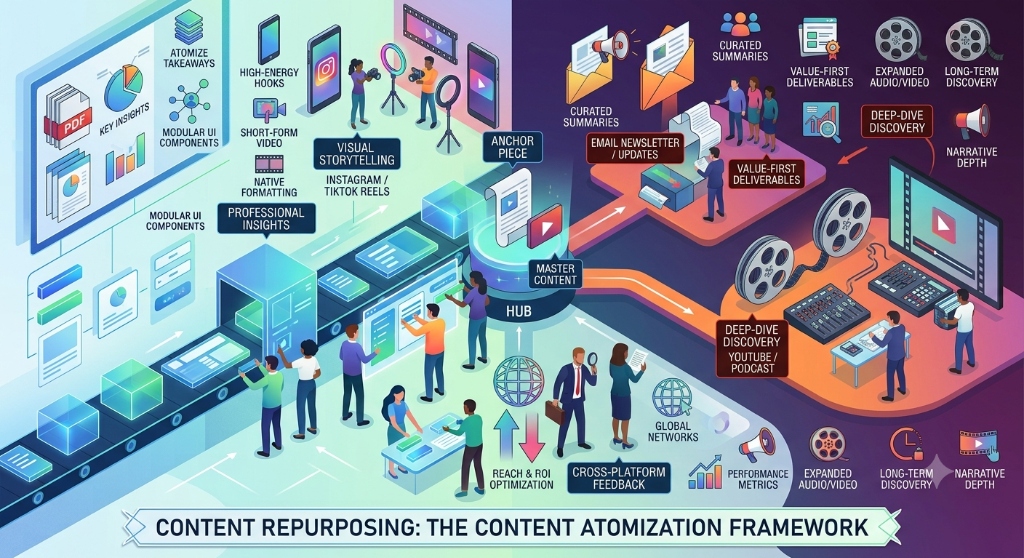
Content repurposing is not simply copying the same paragraph into five different platforms. The goal is to keep the central idea while changing the format, length, presentation, and call to action so that the content makes sense in each channel.
For example, a detailed blog post can become a LinkedIn post, a short-form video script, an Instagram carousel, an email, and a concise X post. Each version should stand on its own while pointing back to the original idea when a deeper explanation is useful.
Start With One Strong Source
The easiest way to repurpose content is to begin with a source that already contains several useful ideas. A detailed blog post, research summary, tutorial, webinar, product guide, or recorded presentation can provide multiple smaller content opportunities.
Before creating the smaller pieces, identify the main argument and the supporting points inside the source.
- Main idea: What is the single most important thing the audience should understand?
- Key lessons: Which sections contain useful advice or actionable information?
- Examples: Which concepts can be explained through a simple scenario?
- Questions: What questions might readers ask after seeing the main idea?
- Next step: What should someone do after consuming the content?
This creates a source map before the repurposing process begins. It also helps prevent every new version from becoming a shallow summary of the original.
The Five-Platform Repurposing Framework
A useful five-platform workflow is to adapt one source into LinkedIn, Instagram, YouTube Shorts or another short-form video channel, email, and X. These platforms can all carry the same central idea, but they should not receive identical copy.
- LinkedIn: Turn the main lesson into a professional insight, explanation, or practical post.
- Instagram: Convert several supporting points into a visual carousel or concise caption.
- Short-form video: Turn the strongest problem and solution into a short script.
- Email: Explain the lesson directly to subscribers and provide a reason to read the complete source.
- X: Reduce one useful insight into a concise post or connected sequence of posts.
The important principle is adaptation rather than duplication. A person scrolling through a visual feed is consuming content differently from someone reading a professional article or opening an email.
1. Repurpose the Content for LinkedIn
LinkedIn works well when the content provides a clear professional insight rather than simply promoting a company article. LinkedIn's own guidance encourages content based on professional expertise, concrete advice, industry insights, and useful ideas.
Start with the strongest idea from the original article and turn it into a focused discussion.
A simple structure is:
- Open with a problem or observation.
- Explain why the problem matters.
- Share three to five useful points.
- Give the reader one practical action.
- Link to the full article only when the additional detail is genuinely useful.
For example, if the original article explains how businesses can improve website performance, the LinkedIn version should not copy the entire article. It could focus on three performance mistakes that teams frequently overlook and explain why each one matters.
The post becomes a useful professional insight rather than an advertisement for the original article.
2. Turn the Same Idea Into an Instagram Carousel
Instagram is more visual, so a long article usually needs to be reorganized into a sequence of small ideas.
A practical carousel structure could look like this:
- Slide 1: State the problem.
- Slide 2: Explain why the problem matters.
- Slide 3: Show the first important lesson.
- Slide 4: Show the second lesson.
- Slide 5: Show the third lesson.
- Slide 6: Give a practical checklist.
- Slide 7: Summarize the main takeaway.
- Slide 8: Tell readers where they can learn more.
Each slide should communicate one idea. Avoid placing entire paragraphs from the source article onto the carousel.
The caption can then provide additional context, explain the topic in more detail, and direct interested readers to the full article.
3. Convert the Main Idea Into a Short-Form Video
A detailed article can also become a short educational video. The video should not attempt to summarize every section. Choose one problem, one lesson, or one process from the original content.
A simple short-form script can follow this structure:
- Hook: Introduce the problem in the first sentence.
- Context: Explain why the viewer should care.
- Three points: Deliver the most useful information.
- Action: Tell the viewer what they can do next.
- Continuation: Point interested viewers toward the complete resource.
For example, an article about website accessibility could become a video explaining three accessibility checks that a website owner can perform without changing the entire website.
The video should provide enough information to be useful on its own. The original article can then provide the deeper explanation for people who want more detail.
4. Adapt the Content Into an Email
Email gives you more room to explain the context behind an idea because the reader has already chosen to receive communication from you.
Instead of sending the complete article again, choose one useful lesson and build a short message around it.
A practical email structure is:
- Opening: Introduce the problem or question.
- Insight: Explain the most important lesson.
- Practical advice: Give the reader one or two actions.
- Additional resource: Link to the complete article for deeper information.
The email should still be useful even if the reader never clicks the article link. This keeps the email from becoming nothing more than a promotional message.
5. Reduce the Idea for X
X requires a much more concise version of the original idea. Instead of attempting to compress the entire article, select one strong point.
You can turn that point into:
- A short explanation.
- A practical tip.
- A question followed by an answer.
- A short sequence explaining a process.
- A useful observation supported by the original article.
The biggest mistake is trying to fit every important point into one short post. A single strong insight is usually easier to understand than a compressed version of an entire article.
Do Not Publish the Same Message Five Times
Repurposing becomes low-value when it means copying the same text everywhere. The source material should remain consistent, but the presentation should change according to the audience and format.
| Platform | Primary format | Best starting point | Adaptation |
|---|---|---|---|
| Professional post | Main lesson | Add professional context and practical advice | |
| Carousel | Several related points | Convert ideas into visual steps | |
| Short-form video | Video script | One problem | Explain the problem and solution verbally |
| Email newsletter | One useful lesson | Add context and a deeper-resource link | |
| X | Short post or sequence | One insight | Make the idea concise and easy to scan |
This approach keeps the core message connected while giving every platform a reason to exist.
Build a Content Repurposing Matrix
Before publishing, create a simple matrix that maps the original content to each platform.
| Source element | Video | X | |||
|---|---|---|---|---|---|
| Main problem | Opening hook | First slide | Video hook | Email opening | Opening post |
| Key lesson 1 | Explanation | Slide | Talking point | Practical advice | Short insight |
| Key lesson 2 | Example | Slide | Talking point | Supporting point | Short insight |
| Key lesson 3 | Actionable tip | Slide | Talking point | Checklist | Short insight |
| Full resource | Optional link | Profile or caption reference | Description reference | Direct link | Optional link |
The matrix makes the relationship between the assets visible. It also makes it easier for a small marketing team to identify what still needs to be created.
Give Each Platform a Different Job
Repurposing works better when every platform has a defined purpose.
- LinkedIn can build professional credibility through useful industry insights and practical explanations.
- Instagram can make concepts easier to scan through visual summaries and step-by-step content.
- Short-form video can demonstrate ideas quickly through spoken explanations or demonstrations.
- Email can deepen an existing relationship by delivering useful information directly to subscribers.
- X can distribute concise ideas and start focused conversations around individual points.
These roles should support one another instead of competing with one another.
Use AI Carefully When Repurposing Content
AI tools can help transform existing material into different formats, but generated drafts still need human review. LinkedIn's current guidance specifically emphasizes that AI-assisted content should reflect the creator's own voice, perspective, and expertise rather than becoming generic or repetitive.
AI can be useful for tasks such as:
- Creating an initial short-form outline.
- Extracting potential talking points from a long article.
- Turning headings into possible carousel slides.
- Shortening a long explanation for a social format.
- Generating alternative structures for review.
Human review is still important for accuracy, tone, brand consistency, originality, and context. The goal is to adapt useful source material, not to automatically produce large quantities of repetitive posts.
Review Every Repurposed Asset Before Publishing
Before publishing the five versions, compare each asset against the original source.
- Is the central idea still accurate?
- Does the platform version make sense without unnecessary context?
- Has anything important been removed during summarization?
- Are claims supported by the original source?
- Does the content contain unnecessary promotional language?
- Does the asset provide value on its own?
- Is the wording genuinely adapted rather than copied?
- Are links working and pointing to the intended resource?
This review is particularly important when AI tools are used because a generated version may change the meaning of the original material while making the writing appear polished.
A Simple Weekly Repurposing Workflow
A small team does not need to create everything at the same time. A repeatable workflow can make the process easier to manage.
- Day 1 — Source: Select one strong article, guide, webinar, or other primary content asset.
- Day 2 — Extract: Identify the main idea, supporting points, examples, questions, and practical actions.
- Day 3 — Adapt: Create the LinkedIn, Instagram, video, email, and X versions.
- Day 4 — Review: Check accuracy, originality, platform fit, links, and tone.
- Day 5 — Schedule: Organize the assets into the publishing calendar.
The exact schedule can change depending on the team and publishing frequency. The important part is having a repeatable process from one source asset to several platform-specific outputs.
When Content Should Not Be Repurposed
Not every piece of content deserves five different versions. Repurposing is less useful when the original material is outdated, too narrow for other audiences, unsupported, or no longer relevant.
It may also be better to create a completely new piece when the platform requires a different subject, a different audience, or a different level of expertise.
The goal is not to maximize the number of posts. The goal is to extend the useful life of strong ideas without reducing their quality.