


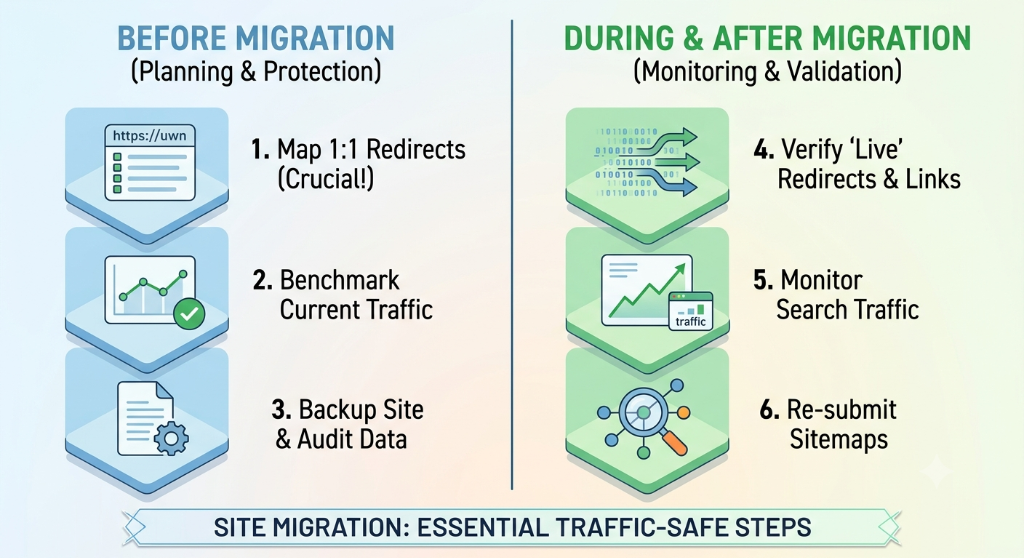

A website migration can involve much more than moving files from one server to another. When URLs, domains, page structures, platforms, or site architecture change, search engines need to discover and process those changes. Users also need to reach the right pages without encountering broken links or unexpected destinations.
A careful migration therefore starts before launch. The goal is to understand the existing site, map important URLs to their new destinations, preserve important technical signals, test the new environment, and monitor the site after the change goes live.
What a Site Migration Actually Changes
The term site migration can describe several different types of changes. A migration may involve changing the domain, moving from HTTP to HTTPS, changing URL paths, moving to a different platform, changing hosting infrastructure, or combining several changes at once.
These migrations do not all carry the same technical requirements. A hosting change without URL changes is different from a domain migration where every URL has a new address.
| Migration type | Typical change | Important SEO considerations |
|---|---|---|
| Hosting migration | Infrastructure or hosting provider changes | Availability, crawling, performance, server configuration |
| URL migration | Page paths change | Redirects, internal links, canonical URLs, sitemap |
| Domain migration | Website moves to a new domain | Redirects, Search Console properties, canonical URLs, sitemap |
| Platform migration | CMS or application platform changes | URL structure, metadata, rendering, internal links, technical SEO |
| Redesign | Visual and structural changes | Content, headings, links, templates, performance and accessibility |
Before planning the migration, identify exactly which parts of the website will change. Changing several major elements simultaneously can make problems harder to diagnose.
Start With a Complete Baseline
Before changing the existing website, create a baseline of its important URLs and technical signals.
The baseline should help the team answer a simple question after launch: what changed, and where?
Useful information to record includes:
- Important existing URLs.
- Organic landing pages.
- Pages receiving meaningful traffic.
- Indexed URLs.
- Existing title tags and meta descriptions.
- Canonical URLs.
- Important internal links.
- Existing XML sitemap URLs.
- Pages returning errors.
- Important redirects already in place.
Google recommends using sources such as sitemaps, analytics, Search Console data, and server logs when determining the URLs that need attention during a site move.
Create the Old-to-New URL Map
The URL mapping document is one of the most important working documents in a migration involving URL changes.
For each important old URL, identify the appropriate new destination. The destination should represent the same content or the closest relevant replacement.
| Old URL | New URL | Redirect | Validation |
|---|---|---|---|
| /old-service | /services/service-name | 301/308 | Destination reviewed |
| /old-blog | /blog/new-slug | 301/308 | Content reviewed |
| /old-category | /resources/category | 301/308 | Destination confirmed |
Do not automatically send unrelated old URLs to the homepage. Google specifically recommends avoiding irrelevant redirects to a single destination because they can confuse users and may be treated as soft 404s.
Use Permanent Redirects Correctly
When an old URL has a corresponding new URL, configure a server-side permanent redirect where technically possible.
Common permanent redirect responses include HTTP 301 and 308. The important part is that the redirect communicates that the resource has permanently moved.
Also avoid unnecessary redirect chains.
For example, this is less desirable:
Old URL → Temporary URL → Another URL → Final URL
A cleaner structure is:
Old URL → Final URL
Google recommends keeping redirect chains short and redirecting directly to the final destination where possible.
Do Not Forget Internal Links
Redirects are not a substitute for updating your own internal links.
After the new site is ready, update navigation menus, related-content links, breadcrumbs, footer links, XML sitemaps, and contextual links so they point directly to the new URLs.
This creates a cleaner user and crawler experience and reduces unnecessary redirect requests.
Run a crawl of the new website and look for:
- Links pointing to old URLs.
- Broken internal links.
- Redirected internal links.
- Incorrect canonical URLs.
- Missing pages.
- Unexpected redirect destinations.
Check Canonical URLs
Canonicalization helps search engines understand which URL should represent a piece of content when multiple URLs may contain the same or substantially similar content.
During a migration, canonical tags should point to the appropriate new URLs rather than continuing to reference old URLs.
Google treats canonical signals as hints rather than absolute instructions, so canonicalization should be consistent with redirects, internal links, sitemaps, and the actual content available on the page.
Review Robots.txt and Noindex Rules
A migration environment may temporarily use robots.txt restrictions or noindex directives while the new website is being tested.
Those restrictions must be reviewed before the production launch.
A page that accidentally remains blocked after launch may not be crawled or indexed as expected.
Check:
- robots.txt rules.
- Meta robots directives.
- X-Robots-Tag HTTP headers.
- Password-protected staging pages.
- Development-only crawl restrictions.
- Important assets required for rendering.
Google specifically recommends checking that temporary noindex or robots.txt restrictions used during a migration are removed when they are no longer required.
Preserve Important Page Signals
A platform or redesign migration can accidentally change more than URLs.
Compare important pages before and after migration to make sure the new implementation still contains the information users and search engines need.
Review:
- Page titles.
- Meta descriptions.
- Heading structure.
- Main page content.
- Canonical tags.
- Structured data where applicable.
- Internal links.
- Image alt text.
- Indexability directives.
- Mobile rendering.
If the migration also changes the content or information architecture, treat that as an additional change that needs its own review rather than assuming the URL redirects will solve everything.
Test the New Site Before Launch
Do not wait until launch day to discover that important pages are broken.
Before the cutover, crawl the new environment and test representative pages from every important template.
Check:
- Homepage.
- Main navigation.
- Service pages.
- Blog pages.
- Category pages.
- Contact and lead forms.
- Search functionality.
- Important landing pages.
- Images and other media.
- Mobile layouts.
- Canonical tags.
- Robots directives.
- XML sitemap.
- Redirect rules.
- 404 and error handling.
A staging environment is particularly useful for finding template-level problems before the production site is changed.
Choose the Migration Timing Carefully
A migration should be scheduled when the team has enough time to monitor the site immediately afterward.
Avoid launching a major migration immediately before a period when nobody will be available to investigate errors.
If traffic is seasonal or varies significantly during the week, the business can also consider whether a lower-traffic period is more appropriate for the cutover. Google recommends considering traffic patterns and ensuring enough resources are available during the migration.
Launch With a Clear Checklist
At launch time, the team should not rely on memory.
Use a documented cutover checklist that identifies which actions must happen and who is responsible for each one.
| Launch area | Check |
|---|---|
| Redirects | Old important URLs redirect to their intended new destinations |
| Canonicalization | New pages use appropriate canonical URLs |
| Internal links | Important links point directly to new URLs |
| Robots | No accidental crawl blocks remain |
| Sitemap | New URLs are included appropriately |
| Analytics | Tracking continues to work |
| Search Console | Relevant properties and sitemap reporting are available |
| Availability | Important pages return the expected HTTP responses |
Submit and Check the New Sitemap
After launch, make sure the sitemap represents the new URL structure.
For migrations involving URL changes, Google recommends submitting the new sitemap in Search Console. This can help Google discover the new URLs and gives the team another way to monitor indexing during the transition.
The sitemap should not be treated as a replacement for redirects. It is one part of the overall migration signal set.
Monitor Search Console After Launch
The migration is not finished when the new website goes live.
Monitor Search Console and your analytics data for unexpected changes.
Pay particular attention to:
- 404 errors.
- Unexpected redirect errors.
- Indexing changes.
- Pages unexpectedly excluded from indexing.
- Canonicalization problems.
- Search impressions and clicks.
- Important landing pages.
- New sitemap processing.
Google notes that ranking fluctuations can occur while its systems recrawl and reindex a migrated site. The duration varies according to the size of the site, server conditions, and other factors, so a migration should be monitored rather than judged from a single day's data.
Compare the New Site With the Baseline
The baseline collected before migration becomes useful after launch.
Instead of asking whether traffic “looks normal,” compare the new site against the specific data collected before the migration.
Review:
- Top organic landing pages.
- Important search queries.
- Indexed page counts.
- HTTP response errors.
- Redirect coverage.
- Organic traffic patterns.
- Important conversion pages.
- Page-level performance.
This makes it easier to identify whether a problem affects the whole website or only a specific group of URLs.
What to Check If Traffic Changes Unexpectedly
A change in organic traffic does not automatically identify the cause. Investigate the migration systematically.
- Check whether important old URLs still redirect correctly.
- Check whether redirects point to relevant destinations.
- Look for redirect chains.
- Check for unexpected 404 responses.
- Review robots.txt and noindex directives.
- Check canonical URLs.
- Check whether important content was removed.
- Check internal links.
- Check the new sitemap.
- Review Search Console indexing information.
- Compare page templates with the previous implementation.
- Check server errors and availability.
Google's migration documentation specifically highlights incorrect redirects, crawl restrictions, other crawl errors, insufficient server capacity, and outdated sitemaps as issues worth checking during a site move.
Do Not Change Everything at Once Without a Plan
A migration becomes harder to troubleshoot when a domain change, URL restructuring, content rewrite, redesign, platform change, and technical SEO changes all happen without a controlled plan.
When possible, isolate major changes so the team can identify which change caused a problem.
For larger websites, Google also recommends considering a staged migration where appropriate. Smaller or medium-sized sites may instead move all URLs at once after adequate testing.
A Practical Site Migration Checklist
- Define exactly what is changing.
- Create a complete list of important existing URLs.
- Record baseline traffic and search data.
- Identify high-value landing pages.
- Create the old-to-new URL mapping.
- Review every redirect destination.
- Avoid irrelevant homepage redirects.
- Test permanent redirects.
- Remove unnecessary redirect chains.
- Update internal links.
- Review canonical URLs.
- Check robots.txt and noindex rules.
- Preserve important page content and metadata.
- Test the new site before launch.
- Verify analytics and conversion tracking.
- Prepare the new sitemap.
- Launch using a documented cutover checklist.
- Submit the new sitemap to Search Console.
- Monitor indexing, errors, traffic, and important landing pages.
- Compare post-launch data against the pre-migration baseline.